Agency Without Assurance: The Security Risks of OpenClaw
OpenClaw launched us into the uncharted territories of thousands of autonomous agents with full computer access. These agents are extremely capable, but when security is not default, risk becomes widespread.
Historically, setting up a server capable of remote command execution, reverse proxying, and WebSocket handling required a baseline level of systems administration competence. A user needed to understand iptables, Nginx configuration blocks, and SSH key management. This requirement acted as a natural filter; those capable of deploying dangerous infrastructure were generally capable of securing it.
"Vibe installing" removes this filter. An OpenClaw (originally Clawdbot, briefly Moltbot) user can simply ask an LLM, "How do I make my agent accessible from my phone?" The LLM trying to be helpful might provide a Docker command that binds ports to 0.0.0.0 or a Cloudflare Tunnel command that exposes the local port to the internet. A user lacking the knowledge to evaluate the implications will create a big security risk.
Localhost Trust
The most critical flaw in early OpenClaw configurations was the mechanism of Localhost Trust. The Gateway was designed with a convenience feature: any request originating from 127.0.0.1 (localhost) was granted full administrative privileges as it's assumed to be secure and only reachable by the user. In modern network architectures, this is false.
Users deploy OpenClaw behind reverse proxies to enable remote access (to control their desktop agent from their phones, for example). Many people set up Nginx, Caddy, or tunneling services like Cloudflare Tunnel and ngrok. This makes the system vulnerable to bypasssing by external attackers:
- An external request arrives at the proxy server (e.g., Nginx) listening on port 443.
- Nginx forwards this request to the upstream OpenClaw Gateway listening on
127.0.0.1:18789. - To the OpenClaw Gateway, the incoming connection appears to originate from
127.0.0.1because the Nginx reverse proxy forwarded it from the local interface. - The Gateway detects the source IP as
127.0.0.1, triggers an automatic approve, and bypasses authentication.
Data from multiple security platforms revealed the scale of the crisis: Censys identified 21,000+ exposed OpenClaw instances as of January 31, 2026, while Hunt.io reported 17,500+ exposed instances.
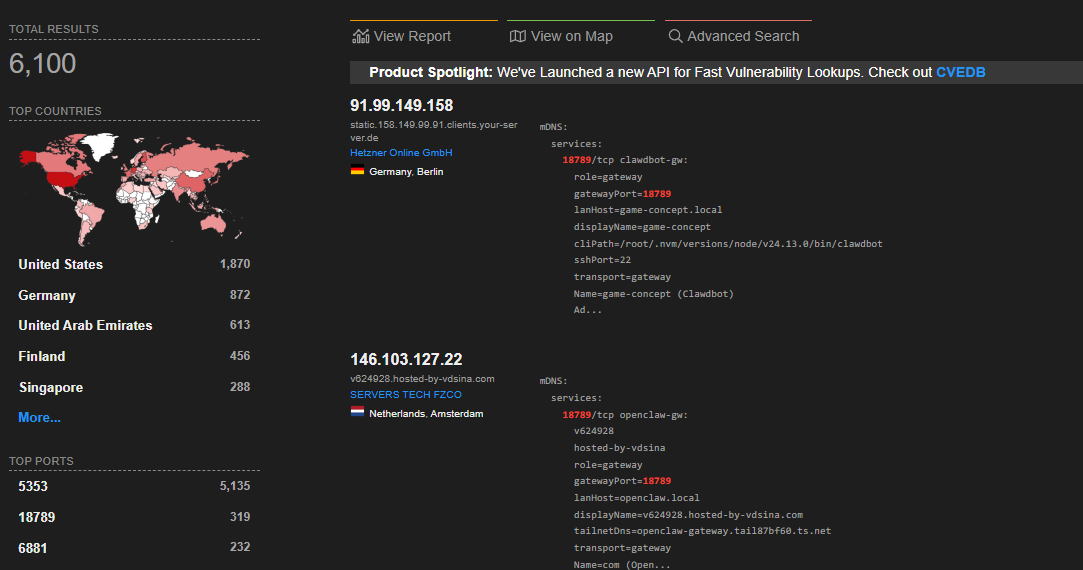 A Shodan search result showing global exposure of OpenClaw Gateways on port 18789.
Permissions and the Principle of Least Privilege
In cybersecurity Principle of Least Privilege states that every user should be granted the minimum access necessary to perform a specific task, no more.
The OpenClaw agent runs with the privileges of the user who started the process. In most vibe installed deployments, users set up the agent inside a Docker container or a VPS as the root user to avoid "permission denied" messages. Even when run as a standard user, the agent has full read/write access to the user's home directory.
When 'move fast and break things' meets shell access, you don't just break things, you give attackers the keys to break everything.
OpenClaw has no internal segregation of duties. The same token that allows an agent to "read emails" also allows it to "execute shell commands" and "read SSH keys". This violates the Principle of Least Privilege. If an agent is compromised, the attacker inherits the full capabilities of the host user.
It is important to note that OpenClaw does not require root access. The documentation explicitly advises against it. The system supports Docker sandboxing and "Human-in-the-Loop" execution approvals, but these safety features are often disabled by users prioritizing convenience over security.
Browser Session Hijacking
One of the most dangerous attack vectors lies the agent's browser usage. Even without stealing cookie files directly, an attacker can utilize the agent's browser automation tools (Puppeteer/Playwright) to hijack active sessions.
If the user is logged into their bank, the attacker can instruct the agent to:
- Open a new tab (hidden or visible).
- Navigate to the bank's transfer page.
- Read the DOM to find the "Transfer" button and input fields.
- Execute the transfer.
Because the agent shares the user's session state (or profile), it bypasses authentication prompts. The attack requires no password theft, only the ability to direct the agent's actions, which is typically done via prompt injection.
Cross-Site WebSocket Hijacking
A specific vulnerability, CVE-2026-25253, allowed for a "1-click" compromise. The vulnerability stemmed from the Gateway's failure to validate the Origin header during the WebSocket handshake. WebSockets are not subject to the Same-Origin Policy in the same way as HTTP requests; it is up to the server to verify that the connection is initiating from a trusted domain. OpenClaw failed to perform this check.
This allowed for Cross-Site WebSocket Hijacking. A malicious website could use Javascript to initiate a WebSocket connection to ws://localhost:18789. Because the browser executes this Javascript from the context of the user's local network, the connection reaches the local OpenClaw Gateway. Simply browsing the web while the agent is running in the background places the user at risk.
(The vulnerability was patched in version 2026.1.29, released on January 30, 2026.)
Supply Chain Attacks
OpenClaw users looking to expand their agent's utility created ClawHub, a community marketplace for "Skills" (plugins). This unmoderated ecosystem became the vector for the ClawHavoc campaign. ClawHub lacked: (1) package signing, (2) maintainer verification, (3) automated static analysis, (4) download count authenticity signals. Security researchers identified 341 malicious skills on ClawHub.
These skills did not exploit code vulnerabilities in the agent itself; they exploited the user. They were told in the README.md prerequisites section that they needed to run a specific command or download a binary to make the skill work. Users vibe installed it, executing the instructions to get the result without auditing the steps. OpenClaw does not install skills autonomously; users explicitly authorized the malware installation because they trusted the context of the repository.
Responsibility
There were truly insecure components in OpenClaw that are being fixed by its developer. At the same time, the tools to secure the system exist. OpenClaw provides a built-in utility: openclaw security audit that scans for exposed ports, missing auth tokens, and overly permissive file access. Many security risks are caused by irresponsible users. But should security be left up to the user?
More and more non-technical people will use these agents. It is important to make them secure by design.
Agency requires security assurance. Security solutions like Tailscale and sandboxing must not just be available; they should be the path of least resistance. If the easiest way to make an agent work is to make it insecure, users will make it insecure.
By Petya, János, Grego @ badcompany.xyz
Check out what we are building: github.com/BadC-mpany/